Доброго утра, как реализовать такой текст с горизонтальными полосами?
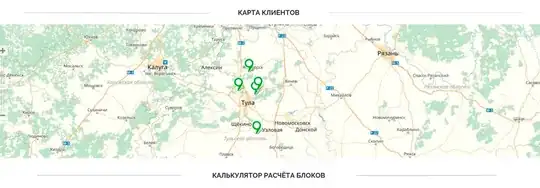
На данный момент разметка такая:
@import url('https://fonts.googleapis.com/css?family=Raleway');
.form_section2 {
 width: 100%;
}
div.map {
    text-align: center;
    position: relative;
    font-family: Releway;
    font-size: 18px;
    min-height: 500px;
    display: flex;
    justify-content: center;
    padding: 40px 0 60.5px 0;
}
.map{
 min-height: 281px;
 width: auto;
}
.content_two{
 width: 100%;
 position: absolute;
 top: -15px;
 display: block;
 font-size: 24px;
 text-align: center;
 font-weight: bold;
  font-family: "Raleway", sans-serif;
}
.content_two p{
 display: inline-block;
 padding: 0 00px  0 00px;
 width: auto;
 font-size: 20px;
 background-color: #F8FCFD;
}
<div class="map">
<div class="form_section2">
<div class="content_two">КАРТА КЛИЕНТОВ</div>
<script type="text/javascript" charset="utf-8" async src="https://api-maps.yandex.ru/services/constructor/1.0/js/?um=constructor%3Af60a70598626f9f1c522be935b35f06356d8ac548df2d1c16e0464adaf3d764b&width=100%25&height=400&lang=ru_RU&scroll=true"></script>
</div>
</div>
